
How to Use Rentec Direct's AI Account Setup Assistant
Rentec Direct's built in AI-Powered Setup Assistant helps you get your account ready faster by importing information from your existing records. Upload a spreadsheet, PDF, printed list, or even a handwritten list, and the Setup Assistant will help extract the information and enter it into your account.
It can also help connect tenants with their properties and appy the appropriate rent setup, property management fees, one-time placement fees, and more. This saves you time on manual data entry as you get started.
Before You Begin
The Setup Assistant is available to account administrators and users with Full permissions.
Gather the information you want to import. This may include:
- Company information
- Properties
- Tenants
- Vendors
- Property management fee settings (Rentec PM only)
- One-time placement fee settings (Rentec PM only)
Your information can come from a spreadsheet, PDF, printed list, handwritten list, or an exported property directory report from another property management system.
Tip: You don't have to organize every detail before you begin. The Setup Assistant can help extract information from your existing records, and you can fill in missing details later.
How to Use the Setup Assistant
The Setup Assistant walks you through the account setup process, helping you enter your information and organize your account without having to manually type every detail.
Step 1: Launch the Setup Assistant
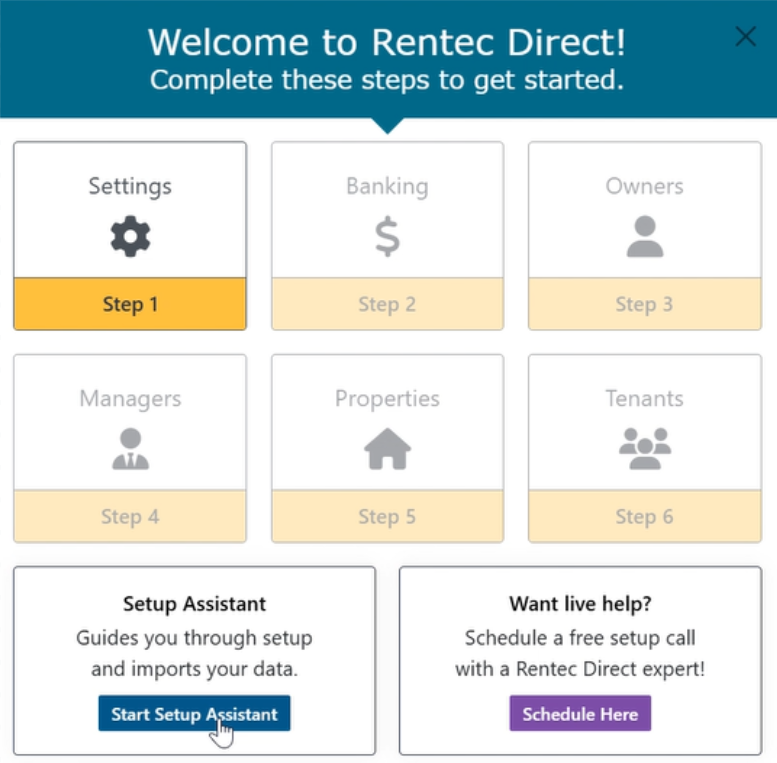
When your new Rentec Direct account is created, you'll see a welcome screen with instructions to get started.
-
Click Start Setup Assistant
Step 2: Review Your Company Information
Review the company information displayed on the screen and make any necessary changes. You can also update this information later.
Step 3: Follow the prompts to add your remaining information.
The software can:
- Place tenants in properties
- Match owners with properties
- Assign management fees and one time placement fees to the properties
- and more
Tip: Larger imports may take some time to process. You can continue working in other tabs or step away while the Setup Assistant works. Return to review the imported information and finish any remaining steps.
You may need to correct information or complete details that weren't included in your original records. You don't have to get everything perfect on the first try. You can review your account and make adjustments as you continue setting up your software.
Step by step instructions for editing data in the Knowledge Base
Prefer Help From a Person?
You can use the Setup Assistant on your own, work with a live, US-based Rentec Direct Account Setup Specialist, or combine both options.
Setup assistance is included with all new Rentec Direct accounts at no additional cost. If you'd like help getting started, you can schedule a session with an Account Setup Specialist.
Have Questions?
The Rentec Direct Success Team is here to help. Contact us if you have questions about importing your information or getting your account ready to use.