
Photos for Property Advertising
Make your available property listings stand out with great photos.
Photo Options for Advertising
Easily add multiple photos to your Rentec Direct marketing info page for display on your website and syndicated sites.
In your Rentec Direct account:
- Click on Properties
- Right-click on the property and select Marketing Info from the drop-down menu
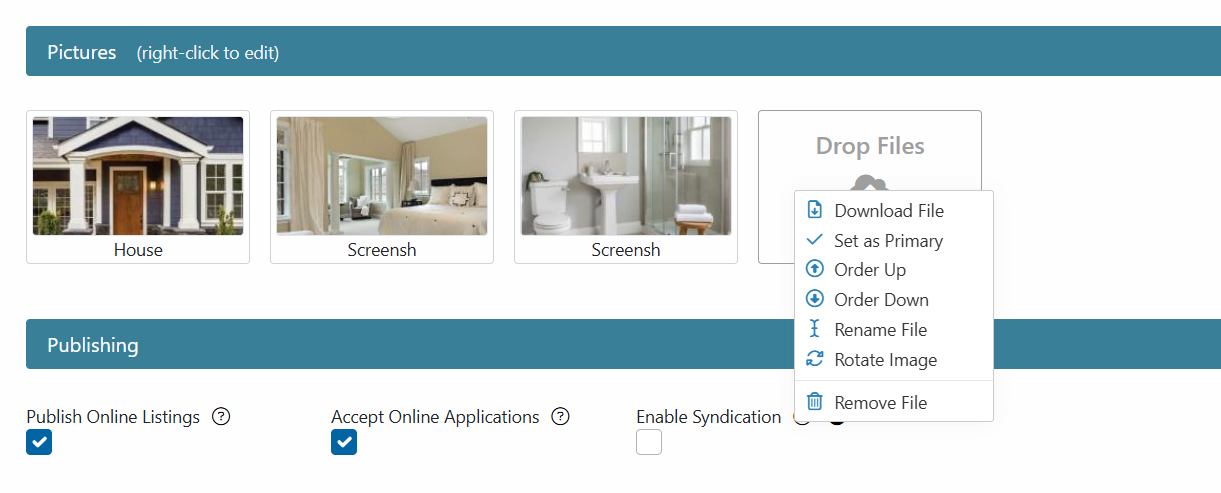
- Under Pictures, add your images by any of the following methods
- Click on Browse to select from your downloaded images
- Drag & drop
- Share from your Rentec Direct File Library
- Right-click on an image to customize the order, display, or remove it.
-
Click on Save Changes when finished
Note: These changes take effect immediately on your Rentec Direct website and may take up to 72 hours to appear on syndicated sites.
Tip: If you're attempting to upload photos in .jpeg format, you will want to convert them to .jpg before uploading.