
Open API Getting Started Guide
Open API is available with every Rentec Direct Pro and PM account to connect Rentec Direct to your favorite tools and services.

Learn more about Open API with Rentec Direct
Want to explore first? Check out a Demo here: Rentec Direct API v3 (3.0.0)
Access & Permissions
By default, Managers and Users with Full Permissions have access to API keys. You can also grant access on a per-user basis using the steps below.
Don’t see “API Keys” or “Utilities” in your account?
Your permissions may be restricted. Contact your account administrator for access.
How to Create an Open API Key
Use the steps below to create API keys as needed.
In your Rentec Direct Account:
- Click Settings
- Under Tools, select Utilities
-
Click on API Keys, then +Add API Key
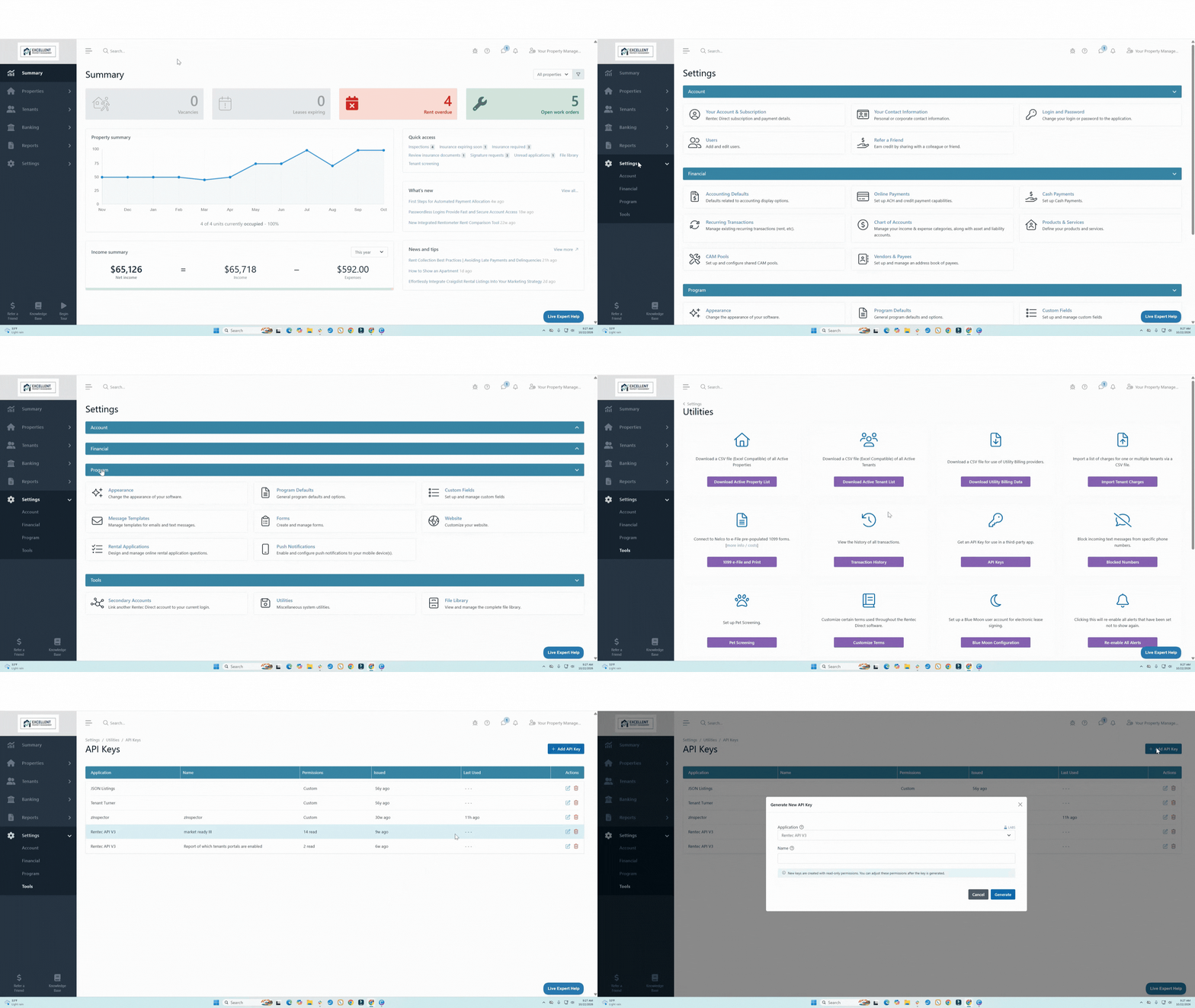
Add Open API to Rentec Direct
- Use the dropdown to select Rentec API V3
- Enter a Name for the key and click Generate
No Developer? No Problem
Using an API to its full potential often requires a developer or technical staff capable of managing RESTful protocols, HTTP methods, JSON data structures, and secure authentication.
We recognize that not every property management office has a software engineer on staff. There are user-friendly platforms that serve as a bridge between Rentec Direct and your workflows, automating tasks without deep technical expertise.
Popular options include:
- Zapier - great for structured logic
- Tasklet.ai - perfect for conversational AI automation
Tasklet.ai, in particular, allows you to "talk" to the API using natural language prompts, bringing enterprise-level power to less tech-savvy users.
Tip: While these tools are helpful, we still recommend having technical assistance on hand for initial setups to ensure your data remains secure and organized.
API Documentation: https://secure.rentecdirect.com/api/v3/docs/
Need help?
- Your Rentec Direct support staff is always here to support our systems and the functionality of our API.
- For third-party tools (Zapier, Tasklet, etc.), please get in touch with their technical support teams.
The Automation Recipe Book
To help you get started, we’ve outlined a few recipes for success. You can build these using Zapier, Tasklet.ai, or similar platforms.
Recipe 1: The Gmail-to-Tenant Messaging Sync
Goal: Automatically record every email sent to a tenant into their Rentec Direct "Message History" for a complete paper trail.
Zapier Setup:
- Trigger: Gmail -> New Sent Email.
- Action: Use the FIND A TENANT action in Zapier to find a matching tenant.
- Action: Use the CREATE A MESSAGE action in Zapier to write the message to the applicable renter_id.
Tasklet.ai Prompt: "Watch my Gmail sent folder. When I email a tenant, I find their record in Rentec Direct and log a copy of that email to their Message History automatically. Reference the Rentec API docs at https://secure.rentecdirect.com/api/v3/docs/"
Note: You could expand this to support all contact types by adjusting Zapier to use the FIND A CONTACT, which will search for any matching contact in vendors, owners, leads, and renters. Or within Tasklet by adjusting the prompt to indicate "email any matching contact" instead of "email a tenant". Likewise, you could adjust the prompt to look at both incoming and outgoing email if you also want to record incoming email to the applicable Rentec Direct contact.
Recipe 2: Emergency Maintenance Dispatch
Goal: Instantly alert your team in Slack and create a Trello card the moment an urgent work order is submitted.
Zapier Setup:
- Trigger: Have Zapier poll the NEW WORK ORDER trigger to be notified immediately when a new work order is created in Rentec Direct
- Filter: Only continue if the priority field is 4 or higher.
- Action: Slack -> Send Channel Message with the tenant's phone number and issue.
- Action: Trello -> Create Card for the maintenance team to track.
Tasklet.ai Prompt: "Whenever a new Work Order is created in Rentec with a priority of 4 or higher, notify my #maintenance-team on Slack and create a new Trello card with all the details."
Recipe 3: The Lease Renewal Assistant
Goal: Automatically notify our leasing agent when a lease is due for renewal
Tasklet.ai Prompt: "Check the Rentec /leases endpoint every morning. If any tenant's lease ends in 90 days, notify me by Slack in my #renewals channel and also send me an email with the applicable property, tenant, and lease details. Also, copy my 'Lease Renewal Template' doc in Google Docs to the Lease Renewals folder and save it as 'Renewal: <Tenant Name>' and update the document with the property and tenant information."
Note: You'll notice we only provide a Tasklet recipe here. Zapier could likely handle most of these tasks as well; however, since it's a multi-step process that also involves editing a Google Doc, Tasklet is a more capable solution, as it uses AI to make these edits intelligently.
Recipe 4: Automated Work Order Scheduling
Goal: Automatically schedule new work orders to your (or your maintenance team's) calendar
Tasklet.ai Prompt: "Check for new work orders in Rentec Direct. Estimate the time needed to complete the repair, then find an available slot on my Google Calendar to schedule it. Include the property address and repair details in the calendar event. Include travel time between my office and the repair location within the calendar event, and also make sure there's a 30-minute buffer between appointments. Do not schedule anything between 12:00 PM and 2:00 PM. If there is not enough information present in the work order, email me and ask me to fill in the details."
Note: Like the last recipe, this recipe relies on AI to intelligently process the data; therefore, it's best done in a tool like Tasklet.
10 More Ways to Power Up Your Portfolio
Here are some additional ideas for your automation strategy.
- Smart Lock Integration: Sync tenant contact info with systems like Yale or Schlage to automatically generate entry codes.
- External Lead Capture: Connect custom website "Contact" forms directly to your Rentec "Leads" list.
- Vendor Compliance Audits: Automatically check for expired Insurance dates and email vendors for updates.
- Emergency Mass Texting: Pull tenant phone numbers into Twilio for instant weather or safety alerts.
- Custom Performance Dashboards: Feed your occupancy and property data into Google Sheets or Power BI.
- Tenant Milestone Greetings: Set up automated "Happy Birthday" or "Move-in Anniversary" messages.
- Digital Welcome Kits: Trigger a "Move-In" email campaign in Mailchimp when a tenant's lease start date falls within 10 days of the move-in date.
- Automated Inspection Scheduling: Trigger an inspection request in an app like zInspector when a lease is set to expire and has no renewal already scheduled.
- Automated Onboarding: Automatically create a Google Drive or Dropbox folder for every new Owner or Property added.
- Ticketing System Sync: Sync Rentec Work Orders into a professional support desk like Zendesk for high-volume teams.
Granting API Key Permissions to Users
The following steps walk through how to allow users access to API Keys
In your Rentec Direct account:
- Click Settings
- Under Account, click on Managers & Users for PM accounts or Users for Pro
- Click on the individual's Permission
- Under Utility Access, change Allow access to Utilities: API Keys to Yes
- Save Changes

Attention Property Management Vendors: Let’s Build Together
Rentec Direct clients have over 16,000 active property managers and over 600,000 units under management. Are you a third-party software provider looking to integrate with the Rentec Direct ecosystem? We would love to work with you. If your integration needs a capability that is not yet included in the API, we can add endpoints upon request.
Please reach out to us at partners@rentecdirect.com to discuss partnership and integration opportunities.
 New features labeled as "Rentec Labs" are just leaving the "lab" (aka our software developers' workshop). A feature included in Rentec Labs has already gone through rigorous internal testing; however, since it is a big new feature it may have had limited testing outside of our offices. Once the feature has been in use externally for some time with no issues, it will leave Rentec Labs. More information on Rentec Labs can be found here: What is Rentec Labs?