
Lost Password
If you've forgotten your password, you can reset it from any Rentec Direct login page by selecting Forgot Password.
Download the Rentec Direct mobile app or visit rentecdirect.com for quick, secure login.
To make future logins easier, consider bookmarking the login page (Ctrl + D on Windows or ⌘ + D on Mac).
- Click on Forgot Password
- Enter your Email address, Phone number, and Zip code
- Follow the instructions in the password reset email to create a new password
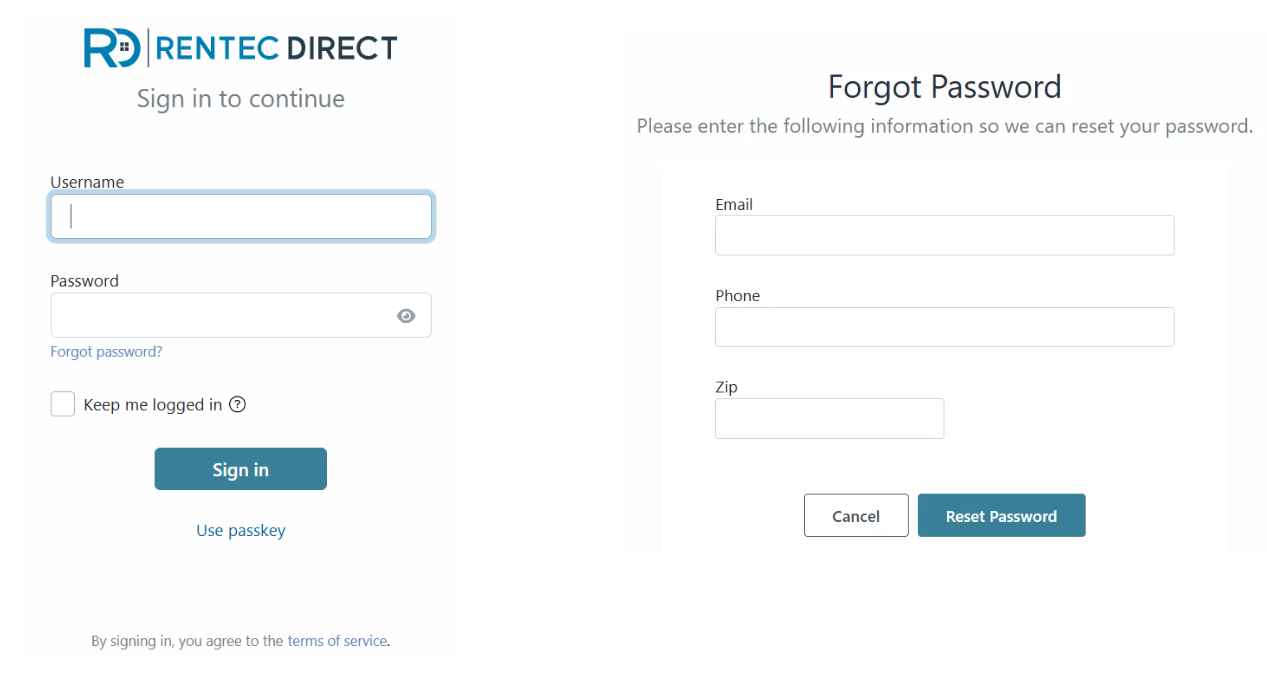
How Password Recovery Works
The password recovery tool verifies your identity using:
- The email address associated with your login
- The phone number in Settings > Your Contact Information
- The Zip code in Settings > Your Contact Information
Be sure to keep your contact information up to date so you can successfully reset your password if needed. If your Zip code has not been entered in your contact information, leave the Zip code field blank and enter only your email address and phone number.
If you are still having difficulty, you are welcome to call for support at 800-881-5139.
Note: We do not offer login details via email.
Tenant Lost Password
If a tenant forgets their Tenant Portal password, they can reset it directly from the Tenant Portal login page. If you're a landlord or property manager helping a tenant regain access, the steps below will guide you through the process.
How to Reset a Tenant Portal Password in Rentec Direct
If a tenant reaches out to you for assistance logging in, ask the tenant to:
- Use the Resident Connect mobile app for the easiest and most secure login experience
- If they are unable to use the mobile app, access the tenant login page from the Rentec Direct website or your personal Rentec Direct website
- Enter their email address as their username
- Select Forgot Password
- Follow the instructions in the password reset email they receive
Tips for helping tenants access their portal
Before a tenant can log in, confirm that:
- The tenant's email address is entered correctly in your Rentec Direct account
- The Tenant Portal is enabled for the tenant
- The tenant is using the same email address associated with their account
Important Note: For security and privacy reasons, Rentec Direct support can only assist the landlord or property manager who manages the account. If a tenant contacts Rentec Direct for assistance, they will be directed to their landlord or property manager. To avoid delays, make sure tenants have your contact information for questions about their Tenant Portal, rent payments, maintenance requests etc.